Basic Information
-
Instructor: Jie Wang
-
Email: jiewangx@ustc.edu.cn
-
Time and Location: Wed., 14:00 PM - 15:35 PM (GT-B112). Fri., 14:00 PM - 15:35 PM (GT-B112)
-
TAs:
- Xilin Xia (xilinxia@miralab.ai)
- Yuhang Jiang (yuhangjiang@miralab.ai)
- Longdi Pan (longdipan@miralab.ai)
- Boxuan Niu (boxuanniu@miralab.ai)
- Rui Liu (ruiliu@miralab.ai)
- Yuyang Cai (yuyangcai@miralab.ai)
- Chi Ma (chima@miralab.ai)
Lectures
All course materials will be shared via this page.
| Index | Date | Topic | Lecture Notes | Homework |
|---|---|---|---|---|
| 00 | Sept 10, 2025 | Introduction | Lec00-Introduction.pdf | |
| 01 | Sept 12, 2025 | Review of Mathematics I | Lec01-MathematicalReview.pdf | |
| 02 | Sept 17, 2025 | Review of Mathematics II | ||
| 03 | Sept 19, 2025 | Linear Regression I | Lec02-LinearRegression.pdf | HW01.pdf |
| 04 | Sept 24, 2025 | Linear Regression II | ||
| 05 | Sept 26, 2025 | Bias-Variance Decomposition | Lec03-BiasVarianceDecomposition.pdf | |
| 06 | Oct 10, 2025 | Convex Sets I | Lec04-ConvexSets.pdf | |
| 07 | Oct 11, 2025 | Convex Sets II | ||
| 08 | Oct 15, 2025 | Separation Theorems I | Lec05-SeparationTheorems.pdf | |
| 09 | Oct 17, 2025 | Separation Theorems II | HW02.pdf | |
| 10 | Oct 22, 2025 | Convex Functions I | Lec06-ConvexFunctions.pdf | |
| 11 | Oct 24, 2025 | Review Session | ||
| 12 | Oct 29, 2025 | Convex Functions II | HW03.pdf | |
| 13 | Oct 31, 2025 | Subdifferential I | Lec07-Subdifferential.pdf | |
| 14 | Nov 5, 2025 | Review Session | ||
| 15 | Nov 7, 2025 | Subdifferential II | HW04.pdf | |
| 16 | Nov 12, 2025 | Convex Optimization Problems | Lec08-ConvexOptimizationProblems.pdf | |
| 17 | Nov 14, 2025 | Review Session | ||
| 18 | Nov 19, 2025 | Decision Tree & Naive Bayes Classifier | Lec09-DecisionTree.pdf, Lec10-NaiveBayesClassifier.pdf | |
| 19 | Nov 21, 2025 | Mid-Term Examination | ||
| 20 | Nov 26, 2025 | Logistic Regression I | Lec11-LogisticRegression.pdf | |
| 21 | Nov 28, 2025 | Logistic Regression II | HW05.pdf | |
| 22 | Dev 03, 2025 | SVM I | Lec12-SVM1.pdf | |
| 23 | Dev 05, 2025 | SVM II | Lec13-SVM2.pdf | |
| 24 | Dev 10, 2025 | Review Session | ||
| 25 | Dev 12, 2025 | SVM II | ||
| 26 | Dev 17, 2025 | Neural Networks | Lec14-NeuralNetworks.pdf | HW06.pdf |
| 27 | Dev 19, 2025 | Convolutional Neural Network | Lec15-ConvolutionalNeuralNetwork.pdf | |
| 28 | Dev 24, 2025 | Principal Component Analysis | Lec16-PrincipalComponentAnalysis.pdf | |
| 29 | Dev 26, 2025 | Reinforcement Learning I | Lec17-RL_DeterministicEnvironment.pdf | |
| 30 | Dev 31, 2025 | Reinforcement Learning II | Lec18-RL_StochasticEnvironment.pdf | HW07.pdf |
Project
1. Description
Glass quality inspection is a common task in industrial production. In many factories, this process still relies heavily on manual inspection, which is both time-consuming and labor-intensive. With the rapid development of AI, training a model to automatically detect glass quality has become an effective way to reduce cost and improve efficiency. In this project, your task is to implement a model for glass defect detection.
2. Dataset
You can download the dataset from here. The dataset is organized as follows:
dataset/
    |- train/
    |	| - img/
    |	| - txt/
    |
    |- test/
    |	| - img/
    |	| - txt/
- The dataset has already been split into training and test sets with an 8:2 ratio.
- The
imgfolders contain PNG images of glass, each of size 320 × 320. - The
txtfolders contain label files with the same filename as the corresponding images. - Each
.txtfile describes the types and locations of defects in that image. - If there is no corresponding
.txtfile for an image, that image should be treated as non-defective.
The label files follow the standard YOLO format. Each line represents one defect and contains five values:
<class_id> <x_center> <y_center> <width> <height>
Where:
-
class_id: defect category, there are 3 defect categories: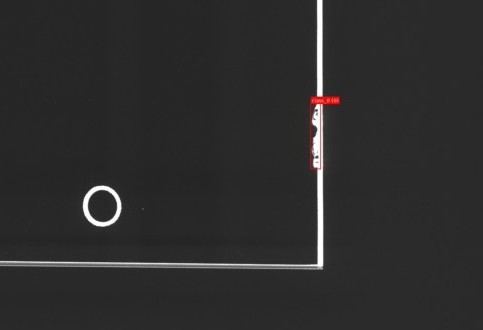
0: chipped edge
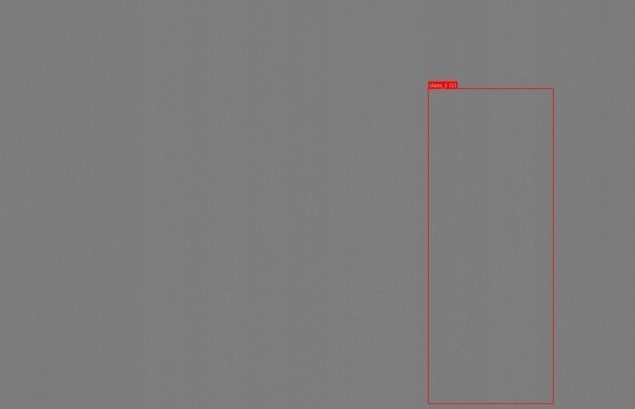
1: scratch
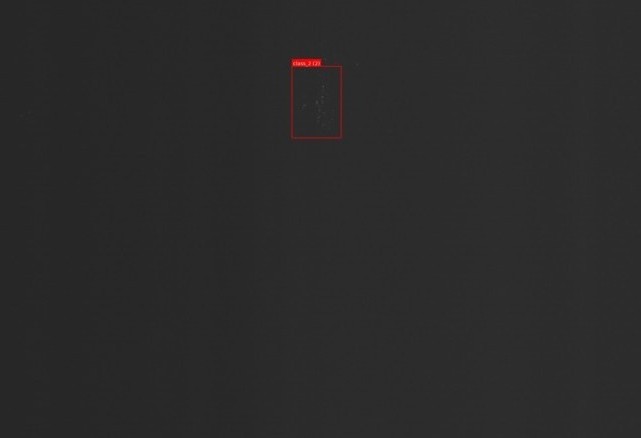
2: stain
-
x_center: x-coordinate of the defect bounding box center, normalized by image width. -
y_center: y-coordinate of the defect bounding box center, normalized by image height. -
width: width of the bounding box, normalized by image width. -
height: height of the bounding box, normalized by image height.
All coordinates and sizes are defined with respect to the top-left corner of the image as the origin, using pixels before normalization.
Class imbalance:
- The dataset is imbalanced: there are fewer defective images than non-defective ones.
- However, the ratio of defective vs. non-defective images is roughly consistent between the training and test sets.
3. Tasks
3.1 Task 1 : Binary Defect Classification
Train a model on the train set to perform binary classification:
- Input: a glass image.
- Output: whether the image is defective or non-defective.
You should:
- Treat an image as defective if its corresponding
.txtfile exists. - Treat an image as non-defective if there is no
.txtfile.
On the test set, you must compute and report at least:
- Precision for defective images
- Recall for defective images
- F1-score for defective images
(You may also report accuracy if you wish, but F1 for defective images is the main focus.)
3.2 Task 2 (Optional): Multi-Label Classification
Formulate the task as a multi-label classification task with four labels:
- No defect
- Chipped edge
- Scratch
- Stain
For each image, you should assign one or more labels:
- If an image has no defects, then it should be labeled as:
no defect = 1, others = 0. - If an image has defects, you should mark a label as 1 if at least one defect of that type appears in the corresponding
.txtfile.
You should report the Micro F1-score of your model on the test set.
4. Requirements
4.1 Implementation Constraints
- Task 1 (from scratch):
- You are not allowed to use any autograd tools or any built-in optimization algorithms from machine learning libraries.
- For example, if you choose a neural network, you must implement both forward and backward propagation yourself.
- You can use the packages in the WhiteList. TAs will update the Whitelist if your requirements are reasonable.
- Task 2 (optional, no restrictions):
- You may use any machine learning libraries and built-in tools you like (e.g. PyTorch, TensorFlow, scikit-learn, etc.).
4.2 Submission Format
You should submit a compressed package named:
[your_student_ID].zip
Inside it, there should be a directory with the same name:
[your_student_ID]/
    |- Task1/
    |	|- main.py
    |   |- For_TA_test.py
    |   |- ... (your other code, models, scripts, etc.)
    |
    |- Task2/ (optional)
    |   |- main.py
    |   |- For_TA_test.py
    |   |- ... (your other code, models, scripts, etc.)
    |
    |- [your_student_ID]-report.pdf   (your project report)
Send this .zip file to:
ml2025fall_ustc@163.com
4.3 Scripts for Training and Evaluation
Task1/main.pyandTask2/main.pyis used by you to train your models.Task1/For_TA_test.pyandTask2/For_TA_test.pyis used by the TAs to run inference using your trained models.
TAs will run your code using the following commands:
cd [your_student_ID]
cd Task*
python For_TA_test.py --test_data_path /home/usrs/dataset/test
Important Note on Test Data:
The test_data_path provided by TAs during evaluation will ONLY contain an img subdirectory. It will NOT contain a txt directory. Your code must not attempt to read label files.
The script For_TA_test.py must:
- Load your trained model.
- Perform inference on all images in the given
test_data_path/imgdirectory. - The inference must complete execution within 1 hour.
- Output: Your script must generate a JSON file named with your Team Leader’s Student ID (e.g.,
PB23000000.json) in the current directory (Task*).
JSON Output Format
A JSON file is a dict. You can use the python package json to read or write a JSON file.
For Task 1 (Binary Classification)
key: The filename of the image without the extension (.png).value: The classification result (true or false).truerepresents defective, andfalserepresents non-defective.
Example (Task 1):
{
    "glass_001": true,
    "glass_002": false
}
For Task 2 (Multi-Label Classification)
key: The filename of the image without the extension (.png).value: A list containing the class indices (1, 2, 3, 4) present in the image. The class indices (1, 2, 3, 4) correspond to the categories defined in Section 3.2.
Example (Task 2):
{
    "glass_001": ["1"],
    "glass_002": ["2", "4"],
    "glass_003": ["3"]
}
Evaluation: The TAs will calculate the appropriate metrics (F1-score for Task 1; Micro F1-score for Task 2) based on your submitted JSON file against the hidden ground truth.
For Task 2, if your program is complex (e.g., requires additional packages, special environment settings, etc.), please include a readme.md explaining:
- How to set up the environment.
- How to run your code and evaluation script.
4.4 Teamwork
- You may work in a team of up to 3 students. If you are confident in your ability, you may of course complete the assignment as a pair or individually..
- In your report, please list each member’s contribution ratio, e.g.:
{San Zhang: 30%, Si Li: 35%, Wu Wang: 35%}.
For team submissions:
- Use the team leader’s student ID as the directory and package name, e.g.
leaderID.zipcontainingleaderID/. - The team leader should be the one to submit the package.
- At the beginning of the report, list the names and student IDs of all team members.
4.5 Trained Models and Dataset
- Remember to save your trained model(s).
- You must submit your trained model files along with the code and report.
- The dataset is large; do not include the dataset itself in the submitted
.zipfile.
4.6 Report Requirements
Please submit a detailed report in PDF format, named:
[your_student_ID]-report.pdf
The report should include at least:
- Introduction
- Methodology
- Model architecture
- Loss functions
- Optimization algorithm (for Task 1, your own implementation)
- Data preprocessing, augmentation (if any)
- Experimental Settings
- Train/validation strategy
- Hyperparameters
- Hardware and software environment
- Results and Analysis
- Quantitative results (precision, recall, F1-score, etc.).
- Plots showing how precision, recall, and F1-score for defective images evolve during training on the training set and the test set.
- Discussion of overfitting/underfitting, class imbalance handling, etc.
- Conclusion
5. Grading
The grading for Task 1 is based on two F1-scores for defective glass images.
-
First score $s_1$
$s_1$ is the F1-score for defective images on the provided test set. You must write this value at the very beginning of your report and highlight it in bold.
-
Second score $s_2$
$s_2$ is the F1-score for defective images obtained when the TAs run your
Task1/For_TA_test.pyscript on another hidden test set. -
Overall score $s$
The final score combines $s_1$ and $s_2$ as: $$ s = 0.3 s_1 + 0.7 s_2, $$ the hidden test performance $s_2$ has higher weight to encourage good generalization.
-
Bonus for Task 2
If you complete Task 2, the TAs will award extra credit based on:
- Whether the task is completed correctly.
- The performance (e.g., Micro F1-score).
- The quality of your modeling and analysis.
6. System Environment
We will evaluate your model on a GeForce RTX 3090 (about 24G memory) under Ubuntu 18.04 system. Please limit the size of your model to avoid OOM.
7. Important Dates
-
Team formation deadline:
The team leader should inform the TAs of all team members (names and student IDs) before 23:59, December 8, 2025.
-
Final submission deadline:
Please submit your
[your_student_ID].zipbefore 23:59, January 23, 2026.
Page view (from Sep 3, 2024):